
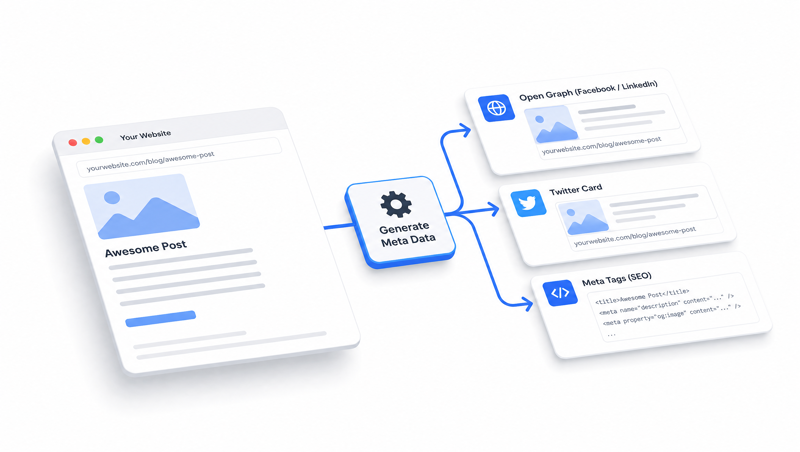
Advanced Twitter/OpenGraph Schema and Meta Tags
Simple Twitter & OpenGraph schema to add rich meta data for your pages for use with social media and other services.
Change Log
- Fixed missing `s1culture` variable value.
- Completely updated version with more dynamic outputs and smart fallbacks.
This code snippet ensures all pages and items have at least some form of content in all the key metadata tags, even if the site admin/s have not added this content specifically.
It may not always produce perfect meta content, but it’s generally better than nothing and provides a good, automatic starting point for SEO best practice.
-
Add the following code to your template <head> and just set the 2 fallback variables at the top of the code to, 1) an image (ideally site logo or icon) to fallback on if no other image is found, and 2) a short site description if no other content can be found.
TIP:
If you use Site Globals for site logo/icon and description, you can add your Site Global handels as the fallbacks, eg:{% assign fallbackImage = sg.companyinfo.logo %} {% assign fallbackDescription = sg.companydescription %}Full Code
{% comment %}<!-- Treehouse CODE v2.0.1 -->{% endcomment %} {% assign fallbackImage = '/favicon.png' %} {% assign fallbackDescription = 'My site description...' %} {% component type: "domain_settings", collectionVariable: "s1domainData" %} {% assign s1culture = s1domainData.FormatSetting.Culture %} {% capture s1metaTitle %}{% if this.OpenGraphProperties.title != null %}{{this.OpenGraphProperties.title | replace:' ', ' '}}{% elsif this.MetaTitle != null %}{{this.MetaTitle | replace:' ', ' '}}{% else %}{{this.name | replace:' ', ' '}}{% endif %}{% endcapture %} {% capture s1description %}{% if this.MetaDescription != null %}{{this.MetaDescription | strip_html}}{% elsif this.Description != null%}{{this.Description | newline_to_br | replace: ' ', ' ' | replace: ' ', ' ' | strip_html | replace: '"', '“' | truncatewords: 30 | strip | escape}}{% else %}{{fallbackDescription}}{% endif %}{% endcapture %} {% capture s1metaImage %}{% if this.OpenGraphProperties.image != null %}{{this.OpenGraphProperties.image}}{% elsif this.smallimage != null %}{{this.smallimage}}{% elsif this.thumbnailimage != null %}{{this.thumbnailimage}}{% elsif this.image != null %}{{this.image}}{% else %}{{fallbackImage}}{% endif %}{% endcapture %} {% capture s1metaImage %}{{request.request_url.origin}}{{s1metaImage | replace: '.svg', '.png' | remove: request.request_url.origin}}?width=1200&height=1200&mode=boxpad{% endcapture %} {% assign s1metaType = this.OpenGraphProperties.type | default: 'website' %} {% capture s1canonical %}{{this.CanonicalLink | default: request.request_url.href}}{% endcapture %} <title>{{s1metaTitle | strip_html}}</title> <meta name="description" content="{{s1description}}"> <meta property="og:title" content="{{s1metaTitle | strip_html}}"> <meta property="og:url" content="{{s1canonical}}"> <meta property="og:image" content="{{s1metaImage}}"> <meta property="og:type" content="{{s1metaType}}"> <meta property="og:description" content="{{s1description}}"> <meta property="og:locale" content="{{s1culture}}"> <meta name="twitter:card" content="summary"> <meta name="twitter:url" content="{{s1canonical}}"> <meta name="twitter:title" content="{{s1metaTitle | strip_html}}"> <meta name="twitter:description" content="{{s1description}}"> <meta name="twitter:image" content="{{s1metaImage}}"> <link rel="canonical" href="{{s1canonical}}">
How it Works
Firstly, we collect all the values we’ll need for our meta tags using Liquid assign and capture variables. This makes our actual meta tag code cleaner by abstracting away all the complex Liquid logic.
fallbackImage & fallbackDescription let us set a ‘worst-case scenario’ for meta descriptions and thumbnail image, only if other page/item content cannot be extracted or is explicitly set.
s1metaTitle first looks for any value set in the items' OpenGraph Title field. It will use this as a priority value over anything else. If not present, it will then check for a value in the item’s Meta Title field, and failing this, it will fall back to the item’s Name.
s1description first looks for the item’s Meta Description field. If no value is present, it will extract a truncated (30 words) and cleaned portion of the item’s body content, and failing this, it will fall back to the general site description you’ve set as the fallback value.
s1metaImage first looks for any value set in the items' OpenGraph Image field. It will use this as a priority value over anything else. If not present, we then guess at 3 common image field names that might exist in a module (smallimage, thumbnailimage, and image). Failing this, it will fall back to the general site logo/icon you’ve set as the fallback value.
It will then prepend the site’s domain to the image path (if it’s not already present), so that images always use an absolute image path suitable for display off-site. It also sizes the image appropriately for social media standards, and if an SVG image has been picked up, it replaces the extension with .png - which will cause a broken image reference, but it will stop the schema code from failing validation due to an unsupported SVG image reference.
s1canonical will check for the item’s actual Canonical value, and if it’s not set, will use the current item’s URL.
Note:
Title, Image, and Description variables also take several steps to ‘clean’ any extracted values of HTML or characters that may corrupt the meta tags and cause broken page code or invalid metadata.
The variables are then wired into the relevant meta tags, which will override the default CMS behaviour to add these when corresponding data is provided.
Comments or questions? Head over to the WebinOne forum to discuss with the community.